Backend Basics for Vibe Coders
Based on our Office Hours session with Differ co-founder Noam Tenne.
If you're building web applications with tools like Cursor, Lovable, or Bolt, you've probably hit a point where you need to understand what a "backend" actually is. Maybe you've seen error messages about databases, authentication, or API keys. Or perhaps you're trying to connect your app to a service like Snowflake or Supabase and feeling lost.
Don't worry—you're not alone. In our recent Office Hours session, Differ co-founder Noam Tenne broke down backend fundamentals in a way that makes sense for vibe coders who are serious about building real applications.
What Is the Backend, Really?
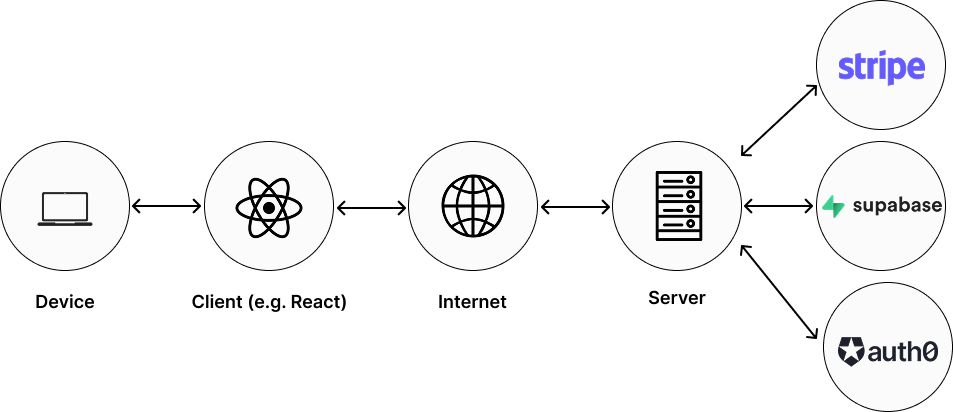
The Client-Server Relationship
The relationship between frontend and backend has existed since the early days of computing. In the 1970s, you had massive mainframes filling entire rooms—that was essentially a backend. Users would connect through simple terminals—the client. Over time, technology has shifted back and forth between "fat clients" (sophisticated apps running locally) and "fat servers" (powerful backends doing most of the work).
Today's landscape is interesting: with React and Next.js applications, we have sophisticated frontends (fat clients) running in the browser, but they still depend heavily on backend services (servers) for data, security, and coordination. It's a hybrid model where both sides do significant work.
Why Vibe Coders Need to Understand Backend Architecture
Your application runs in the user's browser. That's what makes it a web application. The browser fetches the HTML, CSS, and JavaScript, and runs everything locally. But this creates limitations.
The Four Core Reasons You Need a Backend
1. Persistent Data Storage
When users create accounts, save preferences, or generate content, that data needs to live somewhere permanent—not just in your browser's temporary memory. Your browser can't reliably store this data long-term, which is why you need a database managed by a backend system.
2. Secrets and Security
API keys, passwords, authentication tokens—these secrets absolutely cannot live in your frontend code. Everything in your frontend is visible to anyone who uses your app. Storing secrets in the frontend would be like leaving your house key under the doormat with a sign pointing to it.
3. Coordination
When multiple users are working on the same project, editing the same canvas, or collaborating in real-time, something needs to mediate between them. That's coordination, and it requires a backend to manage requests and synchronize changes across different users.
4. Data Processing (CRUD)
Your application needs to perform operations on data: Create new records, Read existing information, Update values, and Delete entries. While some logic can happen in your frontend, the actual database operations must happen on the backend to ensure data integrity and security.
Edge Functions and Serverless: Your Lightweight Backend Solution
Here's the key difference between serverless functions and traditional backend servers:
Traditional Backend Servers: Long-running processes that persist over time, maintain state locally, and handle complex logic continuously. You manage the server infrastructure.
Serverless Functions: Short-lived functions that exist just long enough to fulfill a specific request. They run, complete their task (like fetching data from a database), return the answer, and then spin down. You don't manage any servers—the platform handles everything.
Think of serverless functions as specialized, on-demand workers. When you need to securely connect to a database, a serverless function spins up with the proper credentials, retrieves your data, and passes it back to your frontend—keeping your secrets safe the entire time. Then it disappears until needed again.
The Security Problem: Why You Can't Connect Directly from Frontend to Database
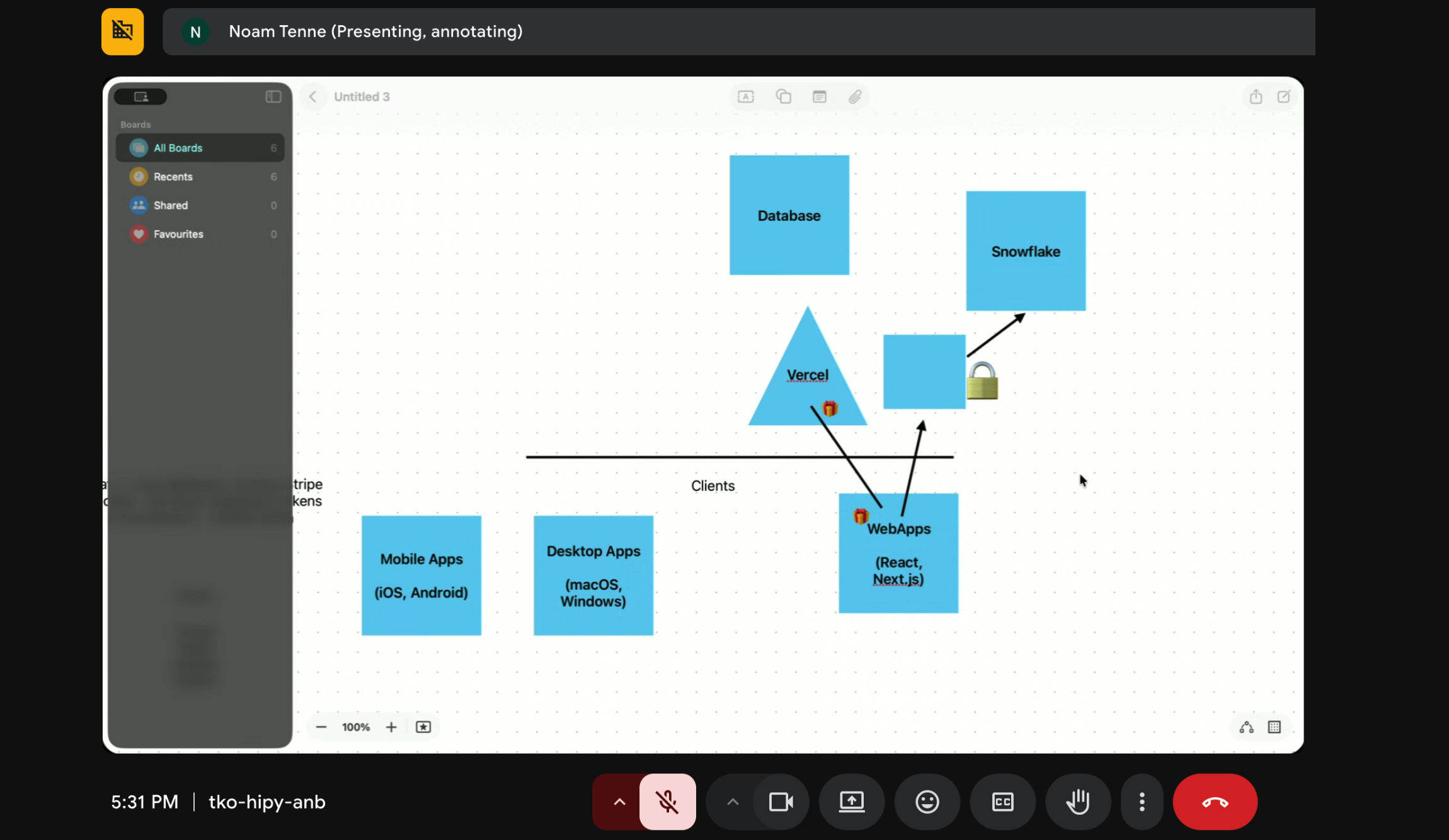
Let's say you're building a dashboard that needs data from Snowflake. You might think: "Why can't I just connect my React app directly to Snowflake?"
Here's the issue: If your frontend makes a direct connection to Snowflake, it needs the password to that database. And remember—everything in your frontend is visible to users. That password would be exposed in your application code, downloadable by anyone who opens your app.
This is where the backend becomes essential. The proper flow looks like this:
1. User interacts with your frontend application
2. Frontend makes a request to your backend (or edge function)
3. Backend connects to Snowflake using credentials that never leave the server
4. Backend retrieves the data and sends only the relevant information back to the frontend
5. User sees the data, but never has access to your database credentials
The backend acts as a secure intermediary, protecting your sensitive credentials while still giving users access to the data they need.
Understanding Public and Private Key Authentication
Here's how it works:
Public Key
Can be shared openly and is uploaded to the service you're connecting to (like Supabase). Think of it as your identity card.
Private Key
Must be kept secret and secure on your server. This proves you are who you claim to be. Never share this key.
The process works like this: You generate both keys on your computer. You upload the public key to the backend database through their dashboard. Your backend stores the private key securely. When your backend needs to communicate with Snowflake, it uses the private key to authenticate and prove it's really you making the request.
The beauty of this system: The service knows your public key, but without the matching private key, no one else can impersonate you—even if they have access to your public key.
Common Pain Points and Solutions for Vibe Coders
Many vibe coders struggle when trying to connect their apps to existing enterprise systems like Snowflake. The error messages can be cryptic, and the authentication requirements seem overwhelming.
Solution: Break down the problem systematically. First, test your connection outside of your AI coding tool. If you're trying to connect to a database from Lovable and getting errors, try connecting via a simple Python script first. This helps you determine whether the issue is with your credentials or with how Lovable is implementing the connection.
Challenge 2: Testing in Production
Many builders find themselves testing directly in production databases because setting up separate development and staging environments feels too complex.
Solution: For early-stage projects with just a handful of pilot users and non-critical data, testing in production is actually fine—just be transparent with your users about it. Don't worry about elaborate staging environments until you have real scale. However, once you have paying customers or sensitive data, invest in a proper development and staging setup. Most modern database services (Supabase, Neon, etc.) are incredibly scalable and can handle growth from ten users to hundreds of thousands without requiring you to change platforms.
Challenge 3: Choosing the Right Database
With options like Supabase, Turso, Neon, MongoDB, PostgreSQL, and SQLite, how do you choose?
Solution: For 80% of vibe coding projects, a SQL database (like PostgreSQL via Supabase or Neon) will serve you perfectly. These databases are mature, robust, and can handle almost anything you throw at them. Only in edge cases—specific data structures, extreme scale, or unique use cases—would you need to explore alternatives like MongoDB.
When choosing, consider:
• How is your data structured?
• What relationships exist between different entities (users, teachers, students, schools)?
• How will users consume this data?
Give this information to an AI assistant, and it can guide you to the right choice.
Database Options for Vibe Coders in 2025
Supabase: The most famous option, with strong integration across AI coding tools. Offers PostgreSQL with a developer-friendly interface.
Neon: Another PostgreSQL provider with excellent performance and serverless architecture. Popular for its simplicity and modern developer experience.
Turso: Built specifically for edge computing and distributed applications. Great for apps that need low latency globally.
SQLite: Perfect for development and small projects. It's a complete SQL database that runs entirely on your computer—no signup required, no complex setup. Great for getting started, though you'll want to migrate to a hosted solution before launching at scale.
Best Practices for Backend Development as a Vibe Coder
Many builders worry about migrating from one database to another down the line. The truth? Modern database systems are so scalable that you likely won't need to migrate. Focus on building and iterating. Worry about database migration only when:
• You discover your database choice fundamentally doesn't fit your use case
• You face regulatory requirements about where data is stored
• You hit extreme performance bottlenecks that your provider can't solve
2. Challenge Your AI Coding Tools
When your AI tool generates a database schema, don't just accept it. Ask it to explain the relationships. Challenge its choices. Provide more context about your use case and ask: "Does this structure fit what I'm trying to build?"
The more specific information you give—about your users, their workflows, and how data will be accessed—the better your AI tool can design your backend.
3. Use Local Development When It Makes Sense
For projects with API rate limits or when you want to experiment freely, consider local database instances. SQLite is perfect for this. You can test changes locally, and when you're satisfied, push updates to your production database.
4. Recognize You're Already Using Backend Services
If you've built anything with Lovable, Bolt, or Cursor, and haven't signed up for any database tools, you might already be using backend services—you just didn't realize it.
When you integrate Stripe, you're connecting to Stripe's backend that processes payments, handles webhooks, and manages subscription billing. When you add authentication with Clerk or Auth0, their backend is managing password hashing, session tokens, and OAuth flows.
Moving Forward: Ownership Without Overwhelm
Vibe coding has made it possible to build sophisticated applications without being a professional developer. But as you scale from solo builder to launching real products, understanding backend basics gives you the confidence to maintain ownership of your projects.
You don't need to become a backend engineer. You just need to understand enough to make informed choices, work effectively with managed services, and debug issues when they arise.
Key Takeaways
• Serverless functions provide lightweight backend functionality without the complexity of managing servers
• Never store secrets in your frontend code—always use a backend intermediary
• Keys provide secure authentication where your public key identifies you and your private key proves it's really you
• SQL databases work for 80% of vibe coding projects—don't overthink your database choice
• Focus on building now, worry about scaling later—modern database services can grow with you
The backend is not something to fear. It's simply the infrastructure layer that transforms your frontend application from a static website into a dynamic, secure, scalable product that can serve real users.
Want to maintain ownership and understanding of your code as you scale? Learn more about Differ, the code ownership platform built specifically for vibe coders.
Have questions about backend development or want to share your experience? Join our events and community of builders navigating the same challenges. Every vibe coder started exactly where you are now—the difference is just taking that first step toward understanding.